LingBot-World v2 WebRTC Core Experience
This walkthrough exercises TeleFuser's core path: browser controls cross a LiveKit WebRTC room, a retained world-model session generates the next video chunk, and the result returns as a live media track. Run the transport preflight first so signaling and TURN failures are separated from model or GPU failures.
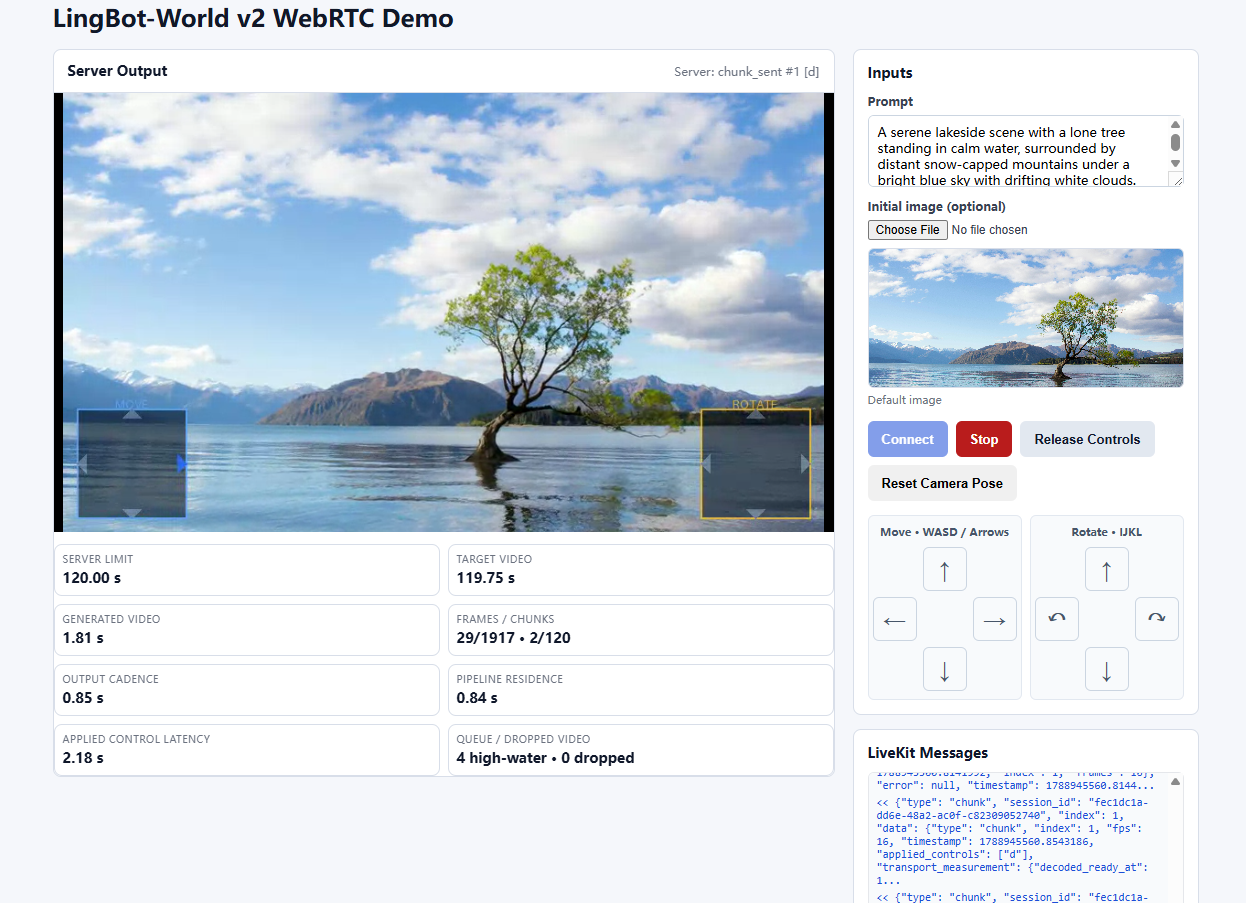
The browser demo combines the generated video, translation and rotation controls, session actions, runtime metrics, and LiveKit messages in one view.
What This Validates
| Stage | Model required | Success signal |
|---|---|---|
| WebRTC preflight | No | Moving test pattern reaches the browser and the D-pad follows held controls |
| LingBot-World v2 | Yes, four H100 profile below | Camera controls produce new world-model chunks in the same room |
flowchart LR
    B[Browser controller] -->|reliable tf.control| L[LiveKit + TURN]
    L --> W[TeleFuser room worker]
    W --> S[Retained pipeline session]
    S -->|generated chunks| W
    W -->|WebRTC video track| L
L --> BRequirements
Complete Installation, then verify the development services:
The browser demo forces a local TCP TURN relay. The commands below use development credentials and loopback addresses; they are not production configuration.
The service commands clear proxy variables so the local LiveKit SDK connects directly to loopback signaling.
LingBot-World v2 Hardware and Weights
The validated profile uses four H100 GPUs. Set the model zoo root to a directory with this layout:
${TF_MODEL_ZOO_PATH}/
├── Wan2.2-I2V-A14B/
│   ├── Wan2.1_VAE.pth
│   └── models_t5_umt5-xxl-enc-bf16.pth
└── lingbot/
    └── lingbot-world-v2-14b-causal-fast/
        └── transformers/
            ├── model-00001-of-00008.safetensors
            └── ... model-00008-of-00008.safetensors
Verify the inputs before loading GPUs:
export TF_MODEL_ZOO_PATH=/path/to/model_zoo
test -f "$TF_MODEL_ZOO_PATH/Wan2.2-I2V-A14B/Wan2.1_VAE.pth"
test -f "$TF_MODEL_ZOO_PATH/Wan2.2-I2V-A14B/models_t5_umt5-xxl-enc-bf16.pth"
test -f "$TF_MODEL_ZOO_PATH/lingbot/lingbot-world-v2-14b-causal-fast/transformers/model-00008-of-00008.safetensors"
The initial image, camera poses, and intrinsics are already under examples/data/lingbot_world_fast/.
1. Verify WebRTC Without a Model
Run the development stack from the repository root in four terminals.
Terminal 1, TCP TURN relay:
turnserver -n -m 1 \
  --listening-ip=127.0.0.1 --relay-ip=127.0.0.1 \
  --listening-port=3478 --min-port=49160 --max-port=49200 \
  --user=livekit-demo:livekit-demo-password --realm=livekit.local \
  --fingerprint --lt-cred-mech --no-tls --no-dtls --no-cli \
  --allow-loopback-peers
Terminal 2, LiveKit signaling and SFU:
Terminal 3, self-contained model-free bidirectional service:
env -u http_proxy -u https_proxy -u HTTP_PROXY -u HTTPS_PROXY -u all_proxy -u ALL_PROXY \
  telefuser stream-serve examples/stream_server/stream_arrow_overlay.py \
  --livekit-url ws://127.0.0.1:7880 \
  --livekit-api-key devkey \
  --livekit-api-secret secret \
  --port 8088 \
  --skip-validation
Terminal 4, browser controller and API proxy:
python examples/stream_server/livekit_bidirectional_demo.py \
  --server-url http://127.0.0.1:8088 \
  --port 8092 \
  --no-open
Confirm readiness:
curl --fail http://127.0.0.1:8088/v1/service/ready
curl --fail http://127.0.0.1:8088/v1/stream/health
Open http://127.0.0.1:8092 and click Start. The preflight passes when the moving test pattern appears, holding W/A/S/D highlights the matching D-pad directions, and Stop closes the session. Do not start the model until this step works.
2. Run LingBot-World v2
Stop the preflight session and Terminal 3 only. Keep TURN, LiveKit, and the browser proxy running, then replace Terminal 3 with the v2 service:
env -u http_proxy -u https_proxy -u HTTP_PROXY -u HTTPS_PROXY -u all_proxy -u ALL_PROXY \
  TF_MODEL_ZOO_PATH=/path/to/model_zoo \
  CUDA_VISIBLE_DEVICES=0,1,2,3 \
  telefuser stream-serve examples/lingbot/lingbot_world_v2_image_to_video_h100.py \
  --livekit-url ws://127.0.0.1:7880 \
  --livekit-api-key devkey \
  --livekit-api-secret secret \
  --worker-gpu-map 0,1,2,3 \
  --max-sessions-per-worker 1 \
  --control-idle-timeout 10 \
  --port 8088 \
  --skip-validation
Wait for /v1/service/ready to return HTTP 200. Refresh the browser page, select an initial image or use the repository default, and click Start. The core experience passes when:
- the page receives a live video track rather than only showing the initial image;
- holding W/A/S/D or I/J/K/L causes newly generated chunks to reflect translation or rotation;
- releasing the controls returns generation to idle without closing the WebRTC room;
- Stop closes the HTTP session and releases retained model capacity.
Remote Development
With VS Code Remote SSH, forward TCP ports 8092, 7880, 3478, and 49160-49200 to the same local ports. The browser page proxies the session API, so 8088 does not need browser-side forwarding.
The loopback TURN listener, static password, disabled TLS, --allow-loopback-peers, LiveKit development credentials, and --skip-validation are for a trusted development host only.
Next Steps
- Stream Server defines room roles, admission, capacity, lifecycle, and production boundaries.
- Streaming Scheduler explains stage ownership and bounded chunk flow.
- LingBot-World Cookbook documents offline validation and performance gates.
- Basic Inference Quickstart provides a smaller single-GPU package and batch-API check.